Ergonomics & Workspace Comfort
How to Choose an Office Chair and Desk for Your Workspace
How to choose an office chair and desk: the adjustments, sizes and features to check, fixed versus sit-stand desks, and how to test before you commit.
- By GuideTutor Editorial Team
- Published
- Last reviewed
- 5 min read
- Level
- Beginner
- Time needed
- 30 minutes of measuring and comparing
- Works with
- Home offices and small offices; fixed-height and adjustable desks; task chairs for desk work
You’ll need
- A tape measure
- Your height and the measurements of the space the desk will fit
- A list of what will sit on the desk, such as monitors, a laptop and a printer
- The seller’s returns information before you buy
In short
An office chair and desk shape how comfortable every working hour feels, so they’re worth choosing carefully. This guide explains which chair adjustments matter, how to size a desk, when a sit-stand desk makes sense, and how to test furniture before committing. It doesn’t recommend brands or quote prices. The key tip: choose adjustability over styling, because a chair that fits you is better than one that only looks the part.
Before you start
Measure your space first: the floor area, the width and depth available for a desk, and the space behind it for the chair to roll back. Then write down what will sit on the desk. Two monitors and a laptop need more depth and width than a single laptop.
If more than one person will use the chair or desk, choose furniture that adjusts across everyone’s heights. If you have back or joint pain, ask a doctor or qualified specialist for advice that fits your needs.
Key terms
- Task chair: a chair designed for desk work, usually with wheels, a swivel and adjustable height.
- Lumbar support: the part of the chair back that supports your lower back. Some chairs let you move it up and down.
- Seat depth adjustment: lets the seat slide forward or back so it suits the length of your thighs.
- Sit-stand desk: a desk that changes height, by motor or by hand crank, so you can sit or stand.
- Load capacity: the weight a desk or chair is designed to hold, listed in the maker’s specifications.
What to look for in an office chair
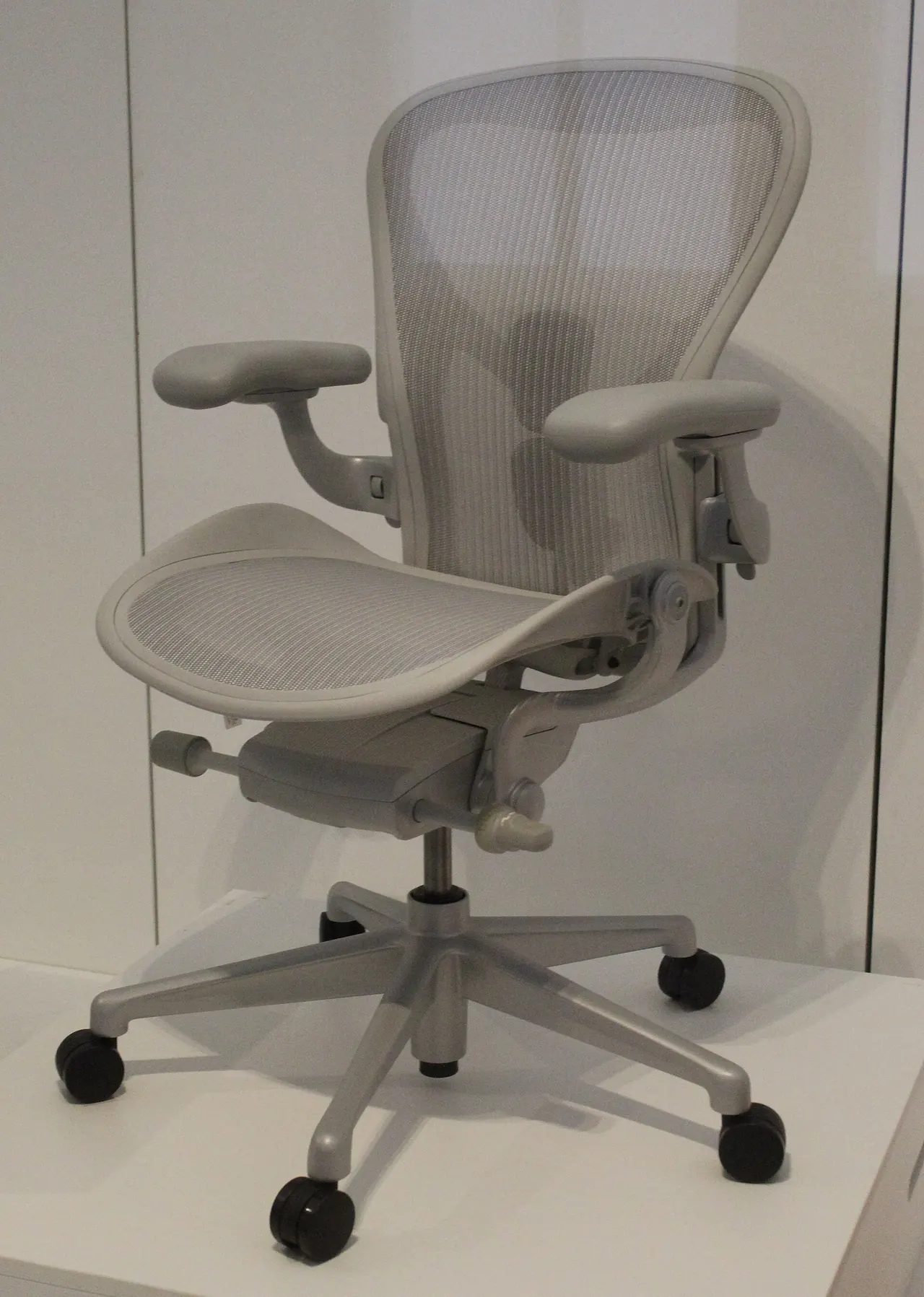
- Seat height adjustment that lets your feet rest flat with thighs roughly level.
- A backrest with lumbar support that meets the curve of your lower back. Adjustable height or depth is a bonus.
- Seat depth that leaves a small gap behind your knees when you sit right back.
- Armrests that adjust or lower out of the way, so they don’t push your shoulders up or stop you getting close to the desk.
- A stable five-point base and casters suited to your floor; hard floors and carpet often need different wheel types.
- Breathable, durable upholstery that’s easy to clean.
- Weight and size ratings that suit everyone who will use it.
Checkpoint: the chair you’re considering offers at least height adjustment, lumbar support and armrests you can lower or remove.
What to look for in a desk
- Height: the desk surface should let your keyboard sit at about elbow height. If you can’t find a fixed desk that suits you, an adjustable one solves it.
- Depth: enough to place a screen about an arm’s length away with the keyboard in front of it.
- Width: enough for your screens, a writing space and anything you use daily, without crowding.
- Leg room: no drawers or crossbars where your knees go.
- Cable management: grommets, trays or channels make tidy cabling much easier. Our cable management guide shows how to use them.
- Stability: the desk shouldn’t wobble when you type, especially at standing height.
Fixed or sit-stand?
- Choose a fixed-height desk if it already matches your elbow height and you’re happy to sit, with regular breaks to stand and move.
- Choose a sit-stand desk if several people of different heights share the desk, or you want to change between sitting and standing during the day.
- If you choose a motorized desk, check the height range covers both your seated and standing elbow heights, and plan cables with enough slack for the full range of movement.
- If you want to try standing work before buying a new desk, a desktop converter that sits on an existing desk is another option; check it’s stable and leaves room for the keyboard.
Test before you commit
- Sit in the chair for at least several minutes, adjusting each control, if you can try it in person.
- If buying online, read the maker’s measurements carefully and check the returns policy before ordering.
- Once delivered, follow the assembly instructions fully and tighten fittings as directed.
- Set up the chair and desk using the ergonomic desk setup guide, then work normally for a few days before deciding.
Check that it worked
After a week of normal work, your chair should support your back without cushions you have to keep adjusting, your feet should be supported, and the keyboard should sit at elbow height. If you have a sit-stand desk, you should be able to switch heights without unplugging cables or moving equipment.
If something goes wrong
- The chair is too high even at its lowest setting: use a footrest, or look for a chair with a lower height range.
- The desk is too high: raise the chair and add a footrest, or consider an adjustable desk.
- The desk wobbles when standing: check every fitting is tightened as the instructions describe, and keep heavy items near the center.
- Armrests stop you reaching the desk: lower, narrow or remove them if the chair allows.
- A motorized desk stops moving: check its power connection and follow the maker’s reset steps in the manual.
For assembly, parts or faults, contact the furniture maker or seller through their official website.
FAQ
Do I need an expensive ergonomic chair?
Not necessarily. What matters is that the chair adjusts to fit you and supports your lower back. Compare features and measurements rather than relying on a label.
What size desk do I need for two monitors?
Measure the combined width of the two screens and add room either side, plus enough depth to place them about an arm’s length away. Our office equipment checklist helps you plan what else will share the desk.
Is a gaming chair a good office chair?
Some are, some aren’t. Check it for the same things as any task chair: height adjustment, lumbar support that meets your back, and armrests that let you sit close.
Should I use a stability ball instead of a chair?
Some people use one for short periods, but it doesn’t offer back support for long working sessions. A supportive, adjustable chair is the more practical choice for a full day.
Official documentation
These links go to official help pages from software and device makers or US government agencies. GuideTutor is not affiliated with them. When their instructions differ from ours, follow theirs.